
Your feed, designed.
Feedfolio is one app for people who post on Instagram: design posts, carousels and stories, edit your photos and plan how your grid will look, all on your phone. It works offline, and you don’t need an account.
Free to download. Contains ads. Android 8.0 or newer.
Everything between an idea and the post
Make it, edit it, see it on your grid, then save it and hand it to Instagram. No switching between apps.
Design
Posts, carousels, stories, reel covers and highlight covers, from a template or a blank page.
Edit photos
Light, colour, crop, looks, faces, effects and background removal that runs on your phone.
Plan your grid
See your next posts as they will sit on your profile, move them around, and split one photo across posts.
Save and share
Real files in your gallery, a PDF when you need one, and reminders for when to post.
Text that looks designed, in every Instagram size
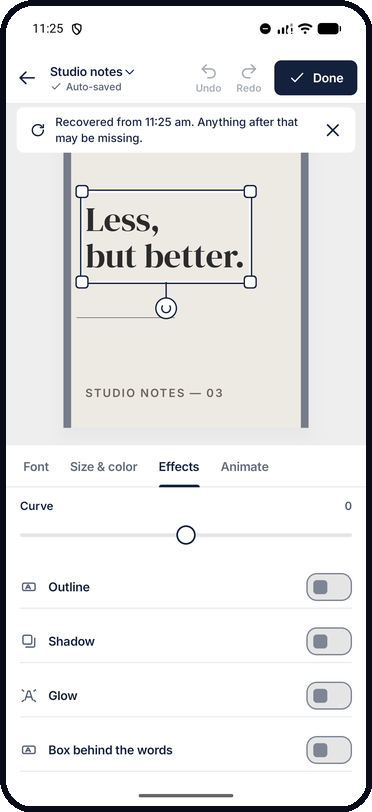
Start from a template or a blank page and pick the shape you need. Every template shows what you can change, and you can see it as a feed post, on your grid or as a story before you start.
- Post, carousel, story, reel cover, photo dump, split for grid, seamless carousel and highlight cover
- Curve, outline, shadow, glow and boxes behind words, live on the canvas
- Your work saves itself as you go, and comes back if the app closes
Give slides and items an entrance
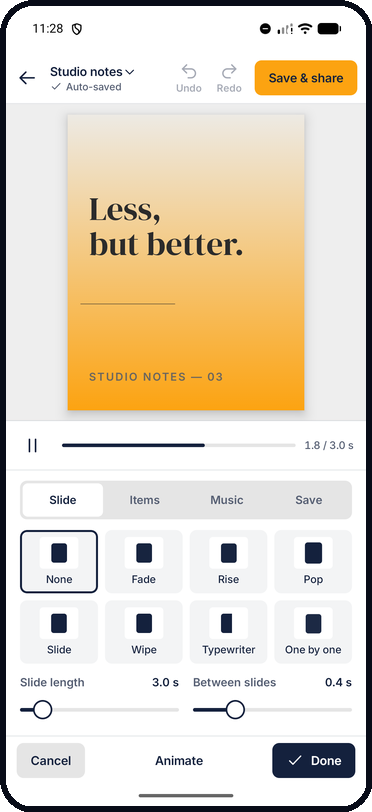
Add motion to a whole slide or to single items, set how long each slide lasts, and save the result as an MP4 video or a GIF. It’s made on your phone.
- Fade, rise, pop, slide, wipe, typewriter and one by one
- Preview it before you save
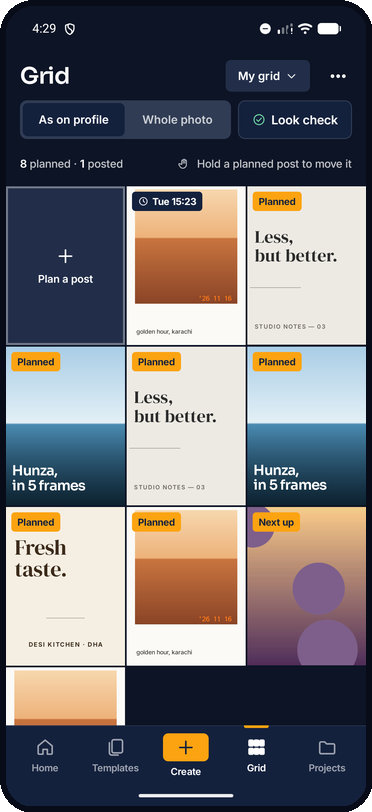
See your next posts before you post them
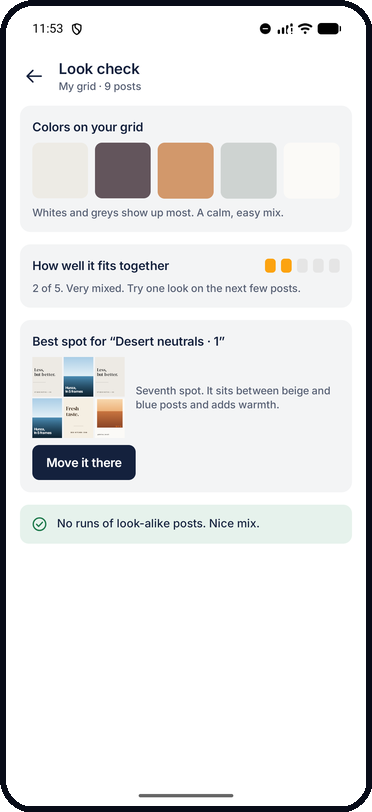
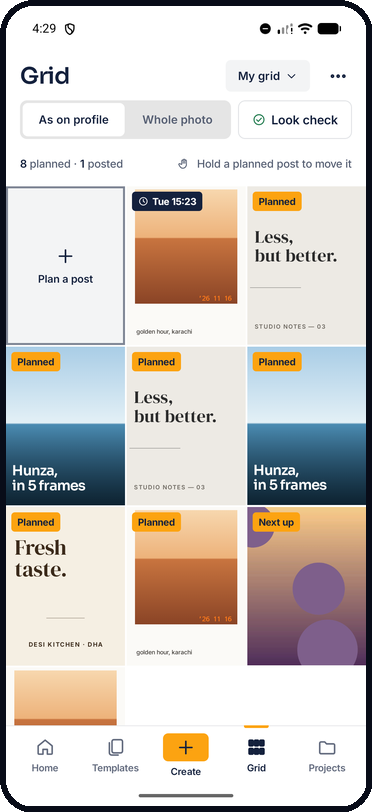
Planned posts sit above what’s already on your profile, cut the way your profile grid shows them. Hold a post to move it. Look check shows the colours on your grid, how well it fits together and the best spot for the next post.
- “As on profile” and “Whole photo” views
- Split one photo across posts, with the pieces numbered in the order to post them
- A calendar with a day and time for each post, and a reminder when it’s time
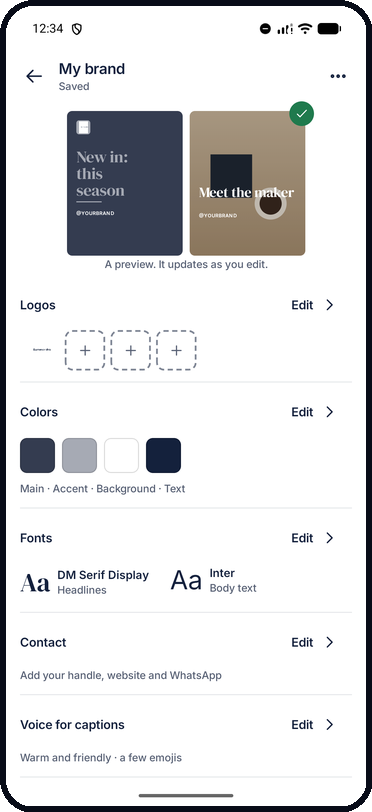
Your logo, colours and fonts on every design
Make a brand kit once with your logos, colours, fonts and @handle. Then use any template “with my brand” in one tap, or add your brand from the editor.
- Start a kit from scratch, from your logo, or from a few of your photos
- No watermark, ever. Add your own mark only if you want one
A photo editor that keeps your original safe
Fix light and colour, crop, try film-style looks, work on one part of a photo, retouch faces, add effects and remove a background. These tools run on your phone. Feedfolio never changes the photo in your gallery: saving makes a new picture.
- Save a look as your own and use it on many photos at once
- Pictures land in your gallery in the album “Feedfolio”, ready for Instagram, WhatsApp or anything else
Your work stays on your phone
Feedfolio is built to work without an account and without the internet. When something needs either, the app says so in plain words.
Works offline
Designing, photo editing, the grid planner and saving all work without a connection.
Photos aren’t uploaded
Your photos are opened and edited on your phone. Feedfolio doesn’t upload them.
Signing in is optional
Sign in with Google only if you want a copy of your projects in your account and on your other phones.
You choose what’s shared
Usage statistics and crash reports follow your consent and have their own switches in Settings › Privacy and data.
Screenshots
Every screen is designed for light and dark mode. Swipe or scroll to see more.
Frequently asked questions
Is Feedfolio free?
Yes, Feedfolio is free to download and use. It shows a small banner ad on the Home and Templates screens. There are no ads in the editor, the photo editor or while you save.
Do I need an account?
No. You can use everything as a guest, and your work is saved on your phone. If you sign in with Google, Feedfolio can also keep a copy of your projects, folders, brand kits and grid plans in your account, so they’re on your other phones too.
Does Feedfolio upload my photos?
No. Photos are opened and edited on your phone, and your originals are never changed. When you’re signed in, the copies kept in your account hold your designs and plans but not your photos. The one exception is the main logo of a brand kit, which is kept as a small image so your brand looks the same on another phone. Details are in the privacy policy.
Does it work offline?
Yes. Designing, photo editing, the grid planner and saving all work without the internet. Signing in, backing up to your account and ads need a connection.
Can Feedfolio post to Instagram for me?
Not in the current version. Save your design, then tap Instagram on the Saved screen: Feedfolio hands the picture to the Instagram app and you post it from there.
Does Feedfolio add a watermark?
Never. You can add your own mark, like your logo or @handle, when you save. It’s off unless you turn it on.
Which phones does it run on?
Android phones with Android 8.0 or newer.
How do I delete my account?
In the app: on Home, tap your photo or the person icon at the top right, then Settings › Privacy and data › Delete my account. Without the app, email us. Both ways are explained on Delete your account.
Questions, ideas or a problem?
Write to us. Tell us your phone model and what you were doing, and we’ll get back to you.